
07 · Corporate LMS for employee training
One transcript for every way you deliver training.
QaliberLMS handles scheduling, enrollment and records for every training format in one system: classroom and virtual sessions, LIVE push engagement, guided lessons, imported SCORM packages, on-the-job training and practical assessment.
The problem
Live training is the hardest kind to run, with rooms, rosters and instructors to manage and sessions that may or may not fill. Most platforms treat it as an afterthought bolted onto an online catalog.
Compared
What you get elsewhere, and what you get here.
What you get elsewhere
- Classroom sessions as a paid extra, if they exist at all.
- Upload content, assign it, mark it complete.
- Instructor scheduling managed in spreadsheets outside the system.
- On-the-job training kept on paper, then typed up later by someone who was not there.
- Completion treated as the finish line.
What you get from Qaliber
- Classroom Manager runs every session, including the roster, sign-in, instructor and room, as a built-in part of the platform.
- The Session Creator Engine builds sessions to meet scheduled demand and books them around instructor availability.
- Enrollment runs itself: people are enrolled by rule, by schedule or through self-service, and every enrollment writes to the same transcript.
- LIVE turns a session into a real blended learning experience. The instructor pushes a question, a poll or a handout to every phone in the room, answers come back in real time, and the instructor sees results and per-learner insight on the spot.
- SCORM packages import and track beside everything else, so the content you already own keeps its value.
- A mentor observes on-the-job training, and learners demonstrate practical skills in person, so competence is verified in person.
Shown
See it working.
Live classroom
Instructor-led, in the room
Sessions are scheduled around the instructor’s calendar, the roster is managed and attendees sign in, so the record shows who was there.
LIVE push
Instant, two-way, in the room
The instructor pushes a question or a handout to every phone. Responses come back in real time, the class’s results appear on screen, and each response is recorded.
Guided lessons & SCORM
Online, however it was built
Guided lessons built in QaliberLMS and SCORM packages you already own, delivered and tracked side by side.
On-the-job
Observed doing the real work
A mentor watches the task, and the form records the observation where the work happens, right where the work happens.
Practical assessment
Demonstrated in person
The learner demonstrates competence to a person who verifies it, so competence is confirmed by a person.
However a module is delivered, it writes to one verified transcript.
From the product
The screens your team would work in.
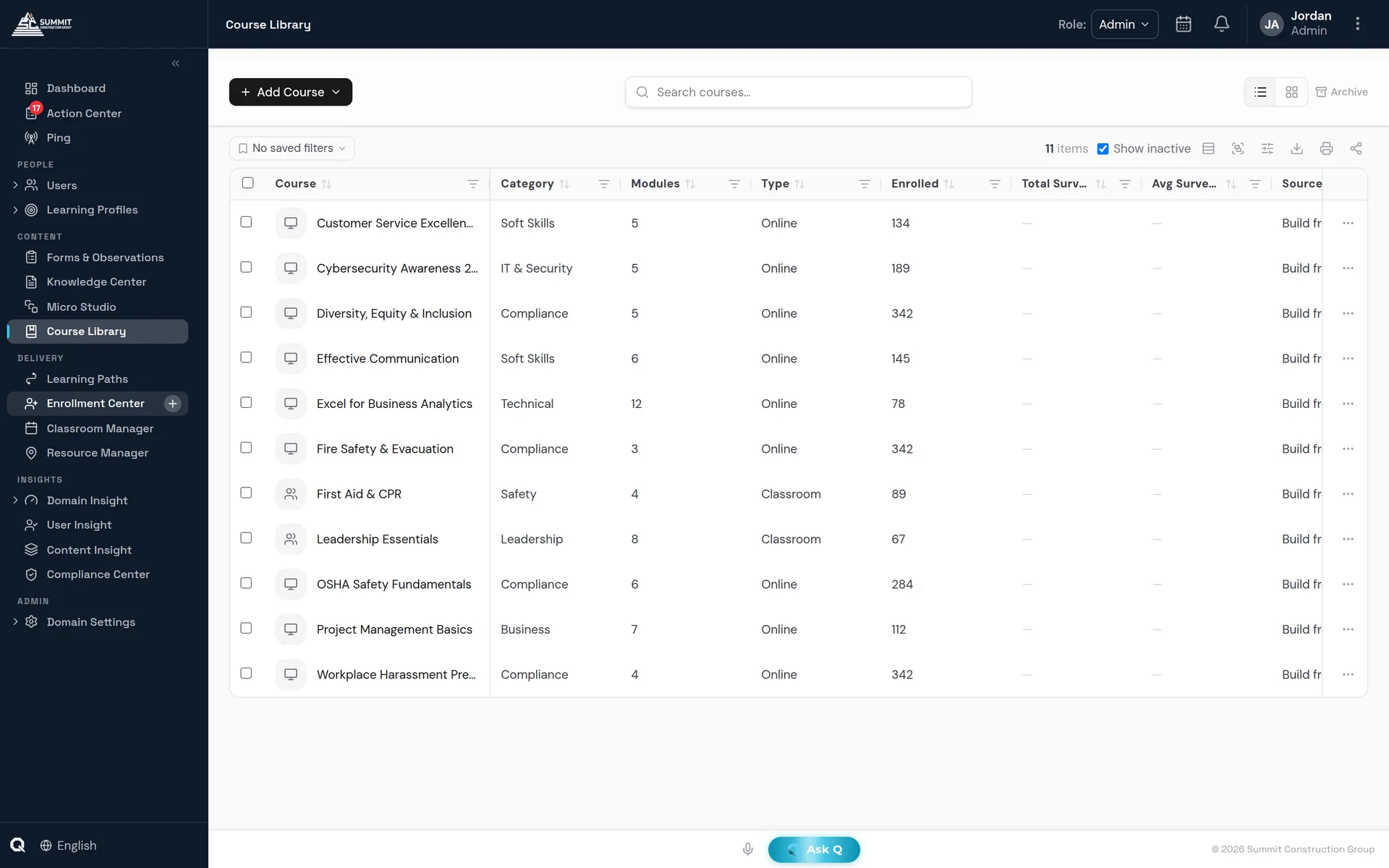
The Course Library — every module, whatever its delivery method, in one place.
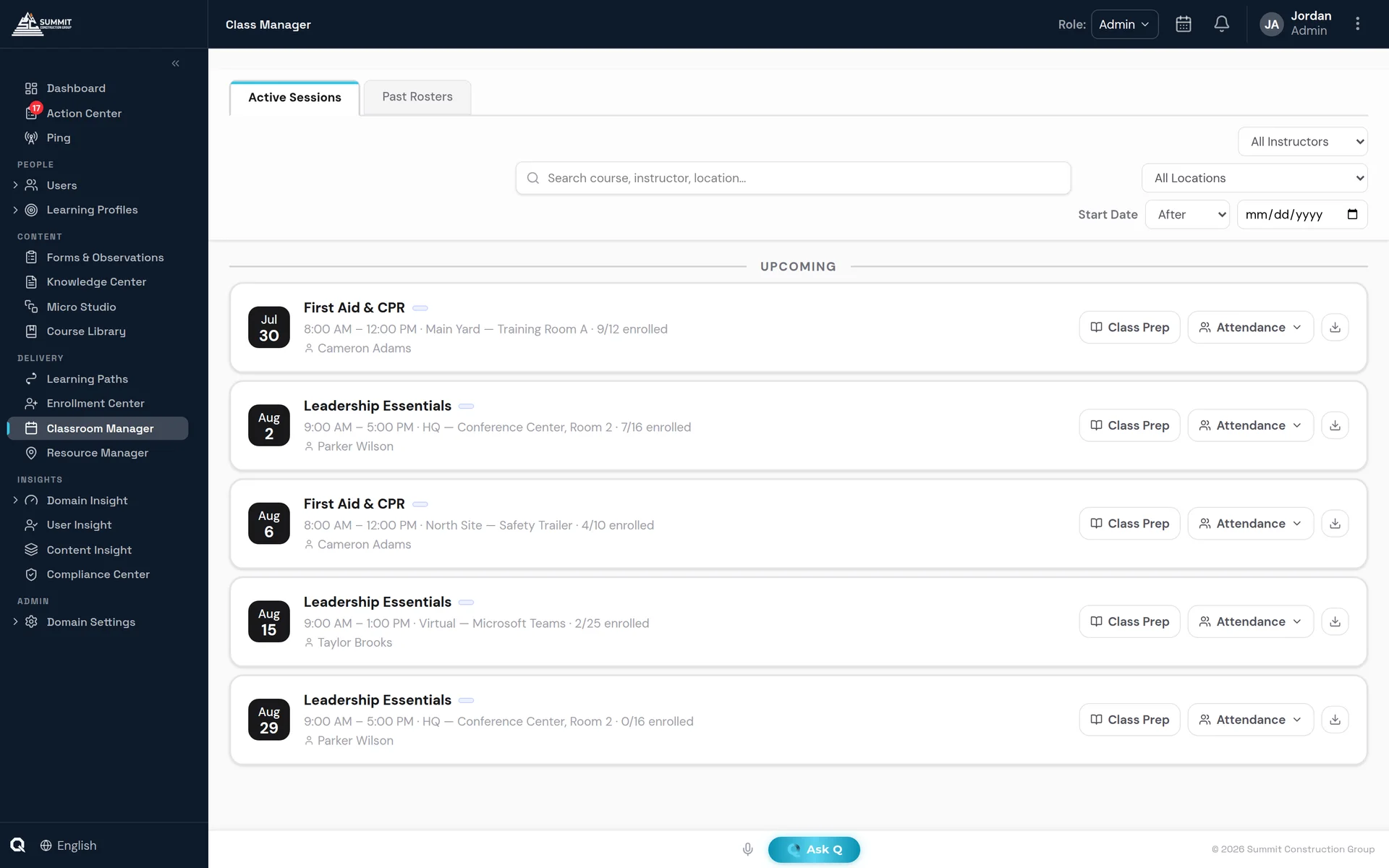
Classroom Manager — where instructor-led sessions are managed.
Included
What's included.
Classroom Manager
Sessions, rosters, rooms and instructors are all managed inside the platform, in one place.
Session Creator Engine
Sessions are created automatically to meet demand and booked around instructor availability.
Every way to enroll
People can be enrolled by rule, by schedule or by their manager, or enroll themselves, and every enrollment lands on the same transcript.
SCORM import
Your existing library imports, plays and reports beside everything else.
LIVE push engagement
The instructor pushes pre-tests, polls and handouts to the room, learners answer on the spot, and the instructor gets instant feedback and per-learner insight.
Practical assessment
A person verifies each skill as it is demonstrated, and the result is recorded as a compliance-grade event.
FAQ
Questions buyers ask.
Can we import our existing SCORM courses?
Yes. SCORM 1.2, SCORM 2004 and cmi5 packages import, play and report beside everything else. Courses can also be exported as SCORM.
Does QaliberLMS run classroom and virtual training?
Yes. Classroom and virtual sessions sit on the same transcript as online training. Zoom and Microsoft Teams meetings are created automatically, attendance comes back on its own, and calendar invites go to Google, Outlook and Apple calendars.
Does it work on phones?
Yes. QaliberLMS installs as a web app on any phone, and microlearning plays offline and syncs completions later.
Which sign-on and HR integrations are supported?
QaliberLMS supports SAML 2.0 and OpenID Connect single sign-on, set up with the Qaliber team; SCIM 2.0 provisioning; HR system roster feeds, with setup guides for Workday, UKG Pro and SAP SuccessFactors; CSV import; and Microsoft Teams notifications.